ExpressVPN for routers: Latest updates and firmware upgrades


To see the full release notes for ExpressVPN for routers, click here.
Stronger, faster, smarter: ExpressVPN for routers is crammed full of new features that we can’t wait for you to use, with even more to come in the weeks ahead.
Here are highlights of new app features and enhancements we’ve recently released.
Why update the ExpressVPN firmware on your router?
Redesigned user interface with Device Groups
We recently introduced Device Groups, which lets you sort your router-connected devices into groups, which can be assigned to different VPN locations.
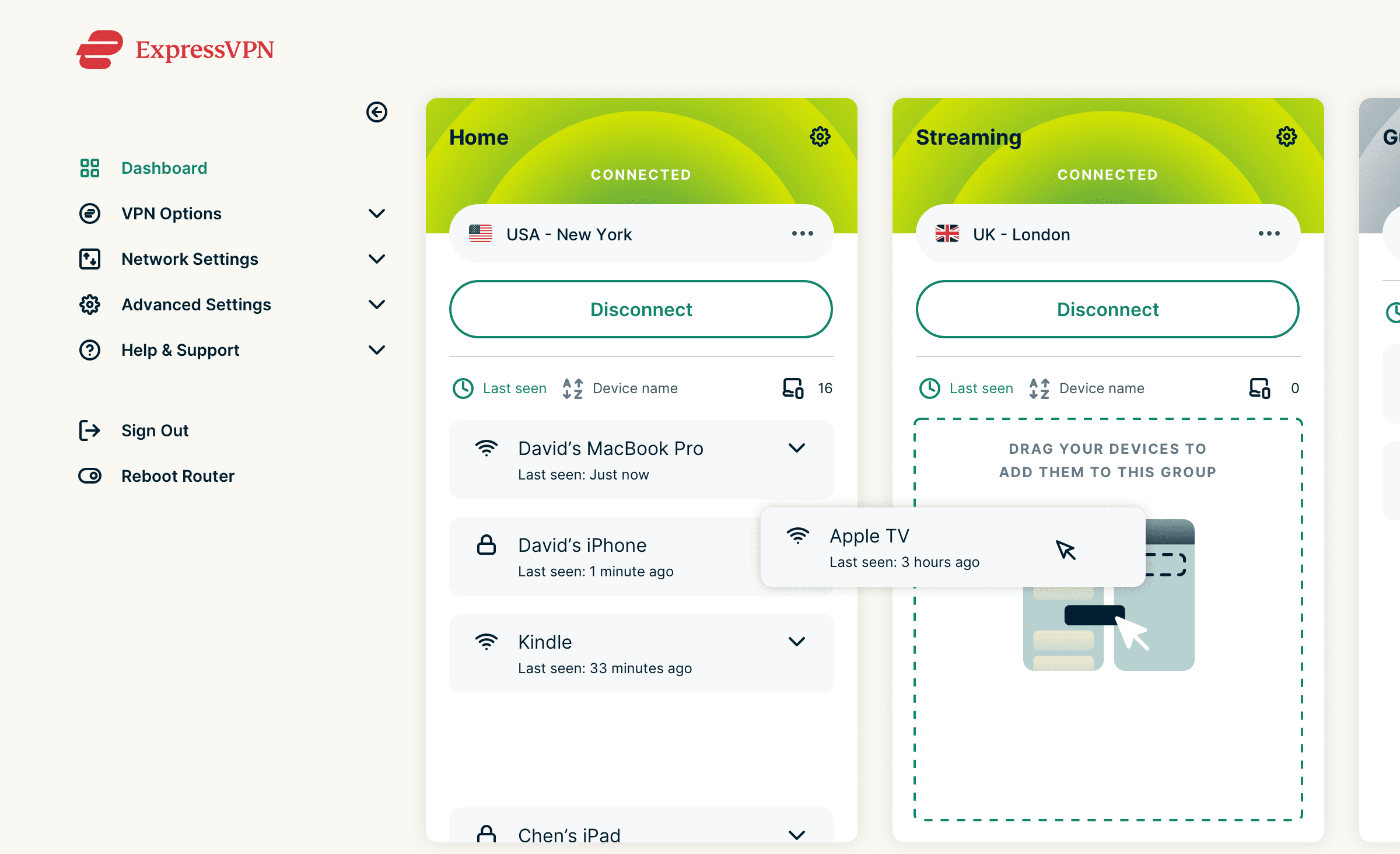
Easily change your devices’ VPN locations whenever you want, for whatever you need—a group for family or friends, one connected to your local area, or even a group to exclude from the VPN network.
Learn more about Device Groups.
Our new VPN protocol: Lightway
Only our more recent versions of ExpressVPN for routers come with Lightway, our groundbreaking protocol built to give you a faster, more reliable, more secure VPN experience.
Regular bug fixes
For your security, it's always important to update all your apps to the latest versions, as developers consistently identify vulnerabilities and patch them.
How to update the ExpressVPN firmware on your router
Starting from v2.7.0 (released March 8, 2021), automatic updates will be enabled by default. This means after updating to this version or newer, you don’t have to manually update your firmware anymore.
If you are using a firmware version that's older than v2.7.0, you will have to manually update your firmware. (Thereafter, it will update automatically.) This is a five-minute process that involves first downloading the latest firmware to your computer or phone and then uploading it.
Here are the detailed instructions to update your router firmware.
Why use a VPN on your Wi-Fi router?
If you have ExpressVPN on your router, anything connected to the Wi-Fi will enjoy the protections of ExpressVPN—and there's no limit to how many devices you can connect to your router. These include devices not normally compatible with VPNs or apps in general, such as game consoles, smart TVs, smart fridges, and any other IoT items.
If you want to stream a show or a film that's censored in your country on your big-screen TV, for example, a VPN on your router can help you change your location and do that.
Once you've set up a VPN on your router, it's easy to control. Just go to expressvpnrouter.com, and you'll see an interface similar to the ones on our desktop and mobile apps. Here, you'll be able to change your location and control which devices are connected to which VPN location.
How do I install a VPN on my home router?
There are three ways to download ExpressVPN onto your home's Wi-Fi router:
- Check if your existing router is compatible with ExpressVPN. If so, you can install our firmware on your router.
- If it's not, you can buy a compatible router and then install ExpressVPN on it.
- Or, buy a router with ExpressVPN pre-installed from our partner Flashrouters.
See our full installation guide here. We'll walk you through the process step-by-step.
FAQ: About ExpressVPN for router
Does using ExpressVPN on my router slow down internet speed?
What routers are compatible with ExpressVPN?
- Asus: RT-AC56(U/R/S), RT-AC68U (up to v3), and RT-AC87U
- Linksys: EA6200, WRT1200AC, WRT1900AC(S), WRT3200ACM, and WRT32X
- Netgear: R6300v2, R6400v2, Nighthawk R6700v3, Nighthawk R7000, and Nighthawk R7000P
What is the best router for ExpressVPN?
Take the first step to protect yourself online. Try ExpressVPN risk-free.
Get ExpressVPN















 Support Center
  Live Chat
  FAQ
FAQ 



Comments
I really had a great experience using the app, it came to my aid in Asia and was exceptionally easy to use. Kudos to the team!
how will I know when the firmware on my expressvpn router needs to be updated?
Hi Steve, a notification will appear on the router login menu.
I'm considering switching to ExpressVPN, however, I already have a firewall solution with pfSense 2.3.3. Do you offer instructions to configure my pfsense router to tunnel all traffic through an ExpressVPN connection?
Hi Denny, here's the guide you're looking for!
Are there more supported expressvpn -routers by now (as 9th april 2017). Must be available or shippable to Finland?
Hi Erkki, we'll be announcing more routers soon. Watch this space!
where can I find the actual changelog of the router firmware versions, to see what has changed ?
I use the WRT3200ACM router. On the 1.5.6 version I got 50+ Mbps download VPN speed. With V2, I now get OVER 80 MBPS download speed! Amazing! :)
Hi, I am running the WRT3200acm and all is fine. I liked the feature where the internet led on front would turn amber when the vpn was disconnected. With the most recent update (2.2.5?) that has stopped working and now stays white all the time. Any help? Many thanks and Happy New Year. Andrew
I miss the feature as well and think its needs to be re-added to the system.
Hi, Jonny! Love ExpressVPN and whatnot and for the last two years, my family and I have been using it all the time while in Korea. However, don't know how to re-install it. Is there a YouTube video (or walkthrough) of how to re-install the firmware? I am a little tech savvy but I can't figure this out. I also have the Linksys 3200ACM. Thanks in advance!
Hi! I hope this guide will work for you: https://www.expressvpn.com/support/vpn-setup/app-for-routers-linksys/
A big part of security for my home network involves MAC filtering. When does ExpressVPN plan on incorporating that into future releases? As it is now it is useless as far as adequate security is concerned. This in reference to the ExpressVPN router firmware.
Hi! ExpressVPN does not spoof your MAC address, and as such your filter should still work.
Why would you want your VPN to filter MACs? Don’t you have the ability to do that on your router, and is there a reason you would decide not to?
Hi, I am using WRT3200ACM router with 2.3.2 firmware. When is the new v2 firmware going to include the possibility of sharing USB hard disks over wifi? The routes has this capability but the firmware does not allow it currently. Thanks!
Yes please! Would love the return of this feature in a (near) future version.
Where can i get Router v2.3.1 firmware?
Hi! You can find instructions and firmware by following the links under "manual setup" on this page.