Presenting ExpressVPN 5.0 for Mac, with a beautiful new look

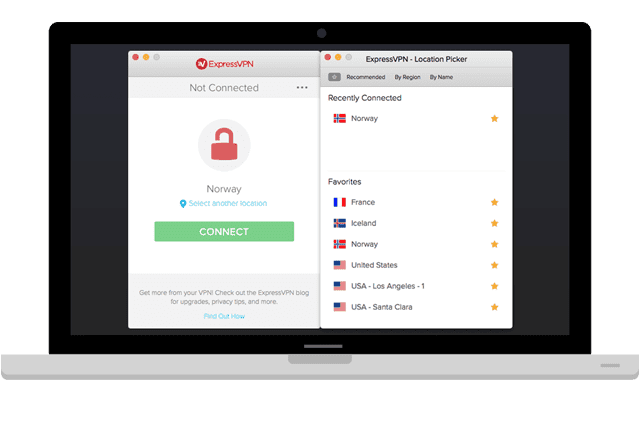
New Year, New Look
We’re thrilled to unveil our handsomest app to date!
Nothing’s changed under the hood, but we felt it was time to give our app a facelift.
Here’s a message from the brains behind the new design, our UX designer, Jenny:
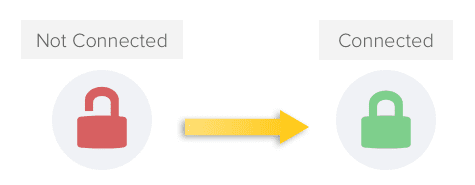
One of our goals was to make the app simpler. We wanted to draw attention to how the app secures your Internet connection. So when you’re not connected to the app, the icon is an open padlock, but when you’re connected, the padlock is closed. We hope you all like the new design!
How to Get ExpressVPN v5 for Mac
To get ExpressVPN 5.0, please follow these steps:
If you're running ExpressVPN v4.x, please click the Update Notification to download the newest app.
Or you can sign in to our website by clicking the MY ACCOUNT link at the top of your screen.

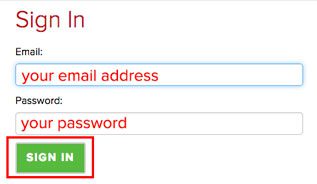
On the Sign In page, enter your email address and password, and click SIGN IN.
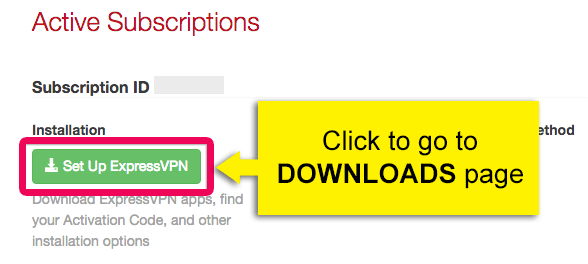
After you have signed in, click Set Up ExpressVPN. You will be taken to the Downloads page.
Under the Mac OS section, click the DOWNLOAD NOW button ExpressVPN 5.0. The file will begin to download to your computer.
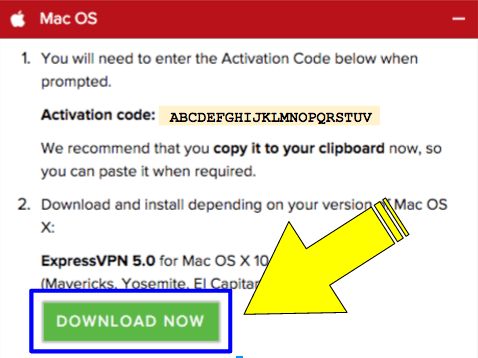
For more detailed instructions on how to install ExpressVPN 5.0, please refer to our tutorial guide:

Try Out the Speed Test
Although the Speed Test feature isn't new, we encourage you to try it if you haven't yet. The Speed Test lets you know which server location will give you the fastest speeds.
If you’re not sure how to use your Speed Test Results, please read our blog post about the VPN Speed Test for Mac.
Let Us Know What You Think!
Have you updated to ExpressVPN version 5? What do you think of our new look? We’d love to know! Share your thoughts in the comments below, or give us a shout on Facebook or Twitter 🙂
Take the first step to protect yourself online. Try ExpressVPN risk-free.
Get ExpressVPN









 Support Center
  FAQ
FAQ  VPN Setup Tutorials



Comments
The link that was posted under step 2 is actually : https://blog.expressvpn.com/users/sign_in Not https://www.express-vpn.com/users/sign_in which it probably should be. It causes 404 errors
Hi, Garath! Thanks for your note. I will look into this. How did you arrive at our blog post, by the way? Hope you're enjoying the new update :) Edited to add: I have edited the post to eliminate confusion!
Any upcoming statement from ExpressVPN on the big Netflix screwover?
Not officially -- but please know that we will do everything we can to keep you connected.
I seem to have some problems with your instructions. I was running ExpressVPN 4.something (downloaded when I signed up less than a month ago) on Mac OS X. First, there is no "update notification inside the app." anywhere to be seen. Not for me at least. I might have missed something and maybe you could put up some screens to guide users to this option. I just went to your website, signed in, and within the Setup area downloaded version 5. Second, with the new version 5 installed, the Location Picker and Speed test menu items are disabled (greyed out) when I am connected to the nearest server. Do I need to do something to activate them? Please guide me.
Hi again, photis! Sorry about that—that was a mistake on my part. I have since updated the blog post with screenshots and clearer instructions. I'm glad you were able to figure out how to download it on your own! :) Thank you for your helpful notes! Second, the Location Picker and Speed Test can only be accessed when you are not connected to any VPN server. To access the Location Picker and Speed Test, please press the DISCONNECT button. I hope this helps, and thank you for reaching out to us. :) Have a great weekend!
When do you delivering the kill switch function for OSX and iOS ?
Hi Ronni, we're doing our best to get this function live as soon as humanly possible. We'll let you know as soon as we have more news. I'm sorry I can't offer you anything more conclusive right now, but we're working hard to make it happen!
To Whom it May Concern: I recently upgraded my version of ExpressVPN from 4.0 to the 5.0 and I have found that after upgrading ExpressVPN it only connects sometimes or not at all and remains in the connecting state. Sincerely, Israel Plascencia
Hi, Israel, Thanks for writing to us. Sorry you're experiencing issues. Can you please contact us via live chat? We can help you instantly from there :) https://blog.expressvpn.com/support/#open-chat
When will Windows get this? I'm interested!
We're working on it :)