ExpressVPN 5.0 for Windows is waiting to meet you!


Click here for the latest ExpressVPN software for Windows
The newest ExpressVPN app for Windows is finally available, and it’s just dying to say hello!
We didn’t think we could do it, but we’ve made it even easier for you to browse and connect to any one of ExpressVPN’s 100+ VPN server locations around the world.
While this new update may look different, it’s still the same great app inside. The new and improved interface makes it easier than ever to connect to your favorite VPN server locations.
Yup, you could say this is ExpressVPN’s most easy-to-use app yet!
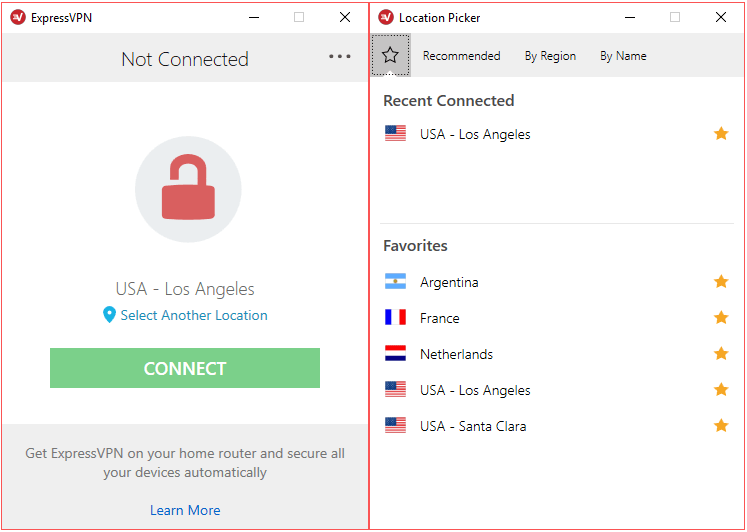
We’ve added brand-new images to help give our app an updated look. The new padlock icon above makes it easier to tell when you’re connected to a server location, so you won’t have to waste time wondering if your VPN is connected.
ExpressVPN version 5.0 also features the privacy-enhancing Network Lock kill switch, which prevents Internet traffic from flowing outside VPN tunnel. Find out more about the Network Lock kill switch here.
Oh! And Don’t Forget About the Speed Test!
This feature may not be new, but it’s still great. The fan-favorite Speed Test makes it easier for you to connect to the VPN server locations that offer the best speeds. Go ahead and give it a try!
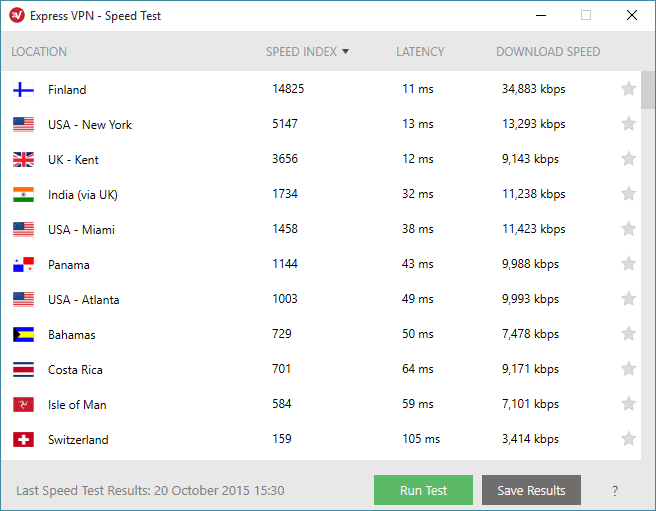
(Not sure how to make sense of the Speed Test results? Read our guide here.)
Download Today!
Ready to update your Windows app? Great! Just head over to My Account, sign in, click “Set Up ExpressVPN”, and download ExpressVPN 5.0 for Windows.
If you’re unsure how to download, you can check out this step-by-step tutorial for help!
What Do You Think?
Once you’ve had time to break in your new Windows app, let us know what you think. We’d love to hear from you! After all, it’s YOU who makes these apps so great! Share your thoughts below!
Also be sure to check out our Facebook or Twitter for more info on privacy, security and all-around awesomeness.
Take the first step to protect yourself online. Try ExpressVPN risk-free.
Get ExpressVPN
















 Support Center
  FAQ
FAQ  VPN Setup Tutorials



Comments
Version 5.0 is broken Windows 10. I would recommend avoiding it at this point. It incorrectly sets your DNS to 0.0.0.0 which causes DNS not to work at all. Very disappointing bug. The only way to work around it is to manually change the DNS IPs after you connect on the VPN.
Hi Tim, sorry you are having issues with the new app's DNS feature. Please try the steps here to fix the problem: https://blog.expressvpn.com/support/troubleshooting/connect-windows-again/
Thanks for the canned answer but it doesn't address this issue. The problem is the new v5.0 client does not correctly set the DNS servers for the VPN connection itself. It sets them to 0.0.0.0 which does not work obviously. The only work around for this bug is to manually go into your IP settings after the VPN is connected and change 0.0.0.0 to 10.0.1.1 (your ExpressVPN DNS server) or some other DNS server. Version 4.2 did not have this problem. Version 4.2 would automatically set the DNS to 10.0.1.1 once you connected. Please fix this asap. Contact me if you are still unclear about why v5.0 doesn't work properly in Windows 10.
Hi Tim. I believe we already have a fix for that. Please get in touch with us via Live Chat on our site here: https://blog.expressvpn.com/support/#open-chat
Hello, please contact us via Live Chat and our support agents will be able to help you out. https://www.expressvpn.com/#open-chat
I subscribe to express for a 1 month trial 4 days ago to test your vpn against strong vpn.and found that china is able to disable express. after connecting to express, and within 2-3 hrs and some time within 1/2 hr. I will have no internet access. reconnecting is not possible, have to cancel reconnection, and re start PC again to have internet access. Strong do have some problem which need tech help to retweet their client every month. I like express connection and the ease to change server. However with this problem- Is this issue is not resolve , It looks like I will have to stay with Strong.