What is IaaS? Infrastructure-as-a-Service explained


Infrastructure-as-a-Service (IaaS) delivers the core building blocks of IT infrastructure in a virtualized form. Instead of purchasing and maintaining physical hardware, organizations rent infrastructure from an IaaS provider and manage it through software-based controls.
This article explains what IaaS is exactly, how it works, its core components, and pricing to help you choose the right cloud model.
What is Infrastructure-as-a-Service (IaaS)?
IaaS is a cloud computing model that provides virtualized computing resources, such as servers, storage, and networking, over the internet. The cloud provider owns and operates the physical data centers, servers, and networking equipment, and makes these resources available to customers on demand. The customer controls the OSs, applications, and configurations running on top of that infrastructure.
How does IaaS work?
IaaS works by abstracting physical hardware into virtual resources that can be accessed and managed through a web console or APIs. When a user requests infrastructure, the cloud platform allocates capacity from its underlying data centers and presents it as configurable resources.
Virtual machines (VMs) and cloud resources
At the core of IaaS are VMs. IaaS providers operate large data centers filled with physical servers. To deliver these servers as on-demand cloud infrastructure, they use virtualization software known as a hypervisor.
The hypervisor runs on each physical server and logically divides its resources to assign them to multiple isolated VMs. This means each VM is essentially a separate software machine: it has its own virtual CPU, memory, disks, and network interfaces.
When you request a server, the cloud platform creates a VM on available hardware and allocates the requested resources. You then manage that VM as if it were a physical server, with full control over the OS, software, and configurations, while the provider manages the physical infrastructure underneath.
On-demand infrastructure
A defining feature of IaaS is on-demand provisioning. Infrastructure resources are provisioned when you request them and released when they are no longer needed, without requiring physical hardware setup.
For example, if you need an additional virtual server to handle a temporary increase in traffic, you can provision it quickly and remove it once demand returns to normal. This ability to allocate and release resources dynamically is a core part of how IaaS operates.
IaaS architecture and core components
IaaS architecture is built on three core layers: compute, storage, and networking. These components are delivered as virtual resources and can be provisioned, configured, and scaled independently.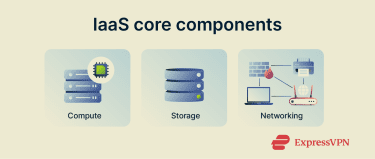
Compute
IaaS compute resources include processors (CPUs), graphics cards or graphics processing units (GPUs), and memory (RAM) inside VMs. When you create a VM (sometimes called a cloud instance or virtual server), you specify how many virtual CPUs and how much RAM it should have. The IaaS provider allocates those from the underlying hardware pool.
Some providers also offer bare metal servers as an IaaS option. These are physical machines assigned to one customer for maximum performance and control. Bare metal can be useful for data-intensive workloads like high-performance computing (HPC) or large databases. But most users choose VMs because they allow fast provisioning and flexibility.
Storage
Storage in IaaS is used to store OSs, application data, databases, backups, and other persistent information. These storage resources are managed independently of compute resources. You can stop, restart, or even delete a VM and still keep the data stored on these volumes, as long as you don’t explicitly delete the storage itself.
There are several storage options, including:
- Block storage: Works like a virtual hard drive connected to a VM. It's a blank disk that the user formats and uses like any internal drive. Block storage is ideal for storing structured data, like files in an OS or records in a database, where speed matters.
- Object storage: Stores data as individual objects, each with its own identifier. It’s built for holding large volumes of unstructured data, such as images, videos, or backups. While it’s not as fast as block storage, it’s far more scalable and cost-efficient.
- File storage: Acts like a shared folder that multiple VMs can access at once. It’s useful for applications that expect a traditional file system, like older business software that stores files on a network drive.
- Snapshots and backups: Cloud platforms let users create exact copies (or “snapshots”) of a VM’s storage at a specific point in time. These can be used to recover data or restore systems after a failure. Snapshots are stored separately and typically charged based on size.
Networking
The networking layer connects VMs and storage and controls how data moves within the cloud, the internet, and on-premises systems.
IaaS providers offer virtual networks, subnets, routers, firewalls, and load balancers that let you route traffic, control access, and distribute requests across resources. Public IP addresses are allocated by the IaaS provider and assigned to resources when you configure them for internet access, while private IP addresses are used for internal communication.
You can also connect your on-premises data center to your cloud network and segment the network into separate subnets to isolate environments such as development and production.
Benefits of IaaS
IaaS offers several advantages over traditional on-premises infrastructure, particularly for organizations that need flexibility, cost control, and reliable performance. These benefits stem from the on-demand, virtualized nature of IaaS.
Scalability and flexibility
IaaS allows infrastructure to scale up or down quickly to match changing demand. You can add VMs or storage in minutes and remove them just as easily, making this model well-suited for workloads that fluctuate over time.
This elasticity is especially useful for scenarios like seasonal traffic or short-term spikes. For example, a retailer can provision additional servers for a holiday sale and shut them down afterward. You can also choose different instance types or sizes as needs change, ensuring you’re not stuck with idle capacity or caught unprepared by increased traffic.
Cost efficiency
IaaS eliminates large upfront hardware investments by shifting infrastructure spending to an operating expense model. You pay only for the resources you use, whether that’s a single development server for an hour or multiple servers running for a day.
Because IaaS providers operate at a massive scale, they can offer competitive pricing. For many organizations, renting infrastructure is more cost-effective than building and maintaining an in-house data center, especially when ongoing costs such as power, cooling, and hardware maintenance are considered.
With IaaS, there are no large up-front hardware costs. Instead, you convert capital expenses into operating expenses. If you need a small development server for one hour, you pay for one hour; if you need 10 servers for a day, you pay for those resources.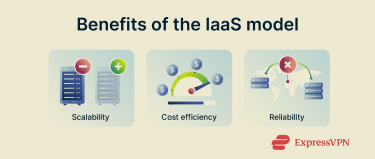
Performance and reliability
Major IaaS providers operate global networks of data centers. You can deploy your resources in multiple regions close to end users, which improves performance and lowers latency.
IaaS platforms are also designed for high availability. Redundant hardware, automatic failover, and built-in load balancing help ensure that applications remain available even when individual components fail. Many providers also offer integrated backup and disaster recovery options, making cloud environments more reliable than self-managed infrastructure in practice.
Common IaaS use cases
IaaS provides the computing power to support building software, hosting websites, analyzing large datasets, or preparing for emergencies without the need to manage physical servers.
Development and testing
IaaS is widely used for development and testing environments because it allows teams to create and tear down infrastructure quickly. Developers can spin up VMs that mirror production systems, test new features or configurations, and shut everything down when testing is complete.
This approach reduces costs, speeds up development cycles, and eliminates the need to maintain permanent test hardware. It also makes it easier to experiment with different OSs, software versions, or configurations without impacting live systems.
Website hosting
Hosting websites on IaaS gives organizations complete control over their software stack and scaling behavior. Unlike shared hosting, which limits customization and resources, IaaS lets you choose the OS, configure the server environment, and deploy custom applications or services.
You can also scale your infrastructure up or down to handle traffic spikes without migrating to a new host. Businesses that rely on consistent uptime and performance, such as e-commerce platforms, benefit from IaaS’s ability to dynamically adjust to user demand.
Big data analytics
IaaS is well-suited for big data and analytics workloads that require large amounts of processing power and storage for limited periods of time. Organizations can provision VMs for short-term analysis and shut them down once processing is complete, helping manage costs while delivering results quickly.
Compute resources can be paired with different storage types, such as block or object storage, depending on the nature of the data. This flexibility allows teams to work efficiently with structured, semi-structured, and unstructured data, making IaaS adaptable to a wide range of analytical workloads.
Backup and disaster recovery
IaaS is commonly used for backup and disaster recovery solutions. Data can be backed up to cloud storage and replicated across regions to protect against hardware failures, outages, or data loss.
In the event of a disruption, organizations can quickly restore systems or spin up replacement infrastructure in the cloud. This approach is often more cost-effective and easier to manage than maintaining a secondary physical data center solely for disaster recovery.
IaaS pricing models
IaaS platforms use flexible billing models that charge based on actual resource usage. Understanding how these pricing models work and what factors influence costs can help organizations manage budgets and avoid unnecessary expenses.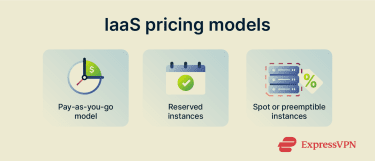
Pay-as-you-go pricing
Pay-as-you-go, also known as on-demand pricing, is the most common IaaS pricing model. You are billed only for the compute, storage, and network resources you use. For example, running a VM for one hour results in one hour of compute charges, and storing 100GB of data for a month is billed for that amount and duration.
Reserved instances
Reserved or committed pricing offers discounted rates in exchange for committing to a certain level of usage over a fixed period, typically one or three years. Instead of paying purely on demand, you agree to pay for a baseline amount of compute resources or storage, whether it is fully used or not. This model is best suited for steady, predictable workloads where long-term usage is known in advance.
Spot or preemptible instances
Some providers offer deeply discounted compute resources that use spare capacity in their data centers. These resources are typically available at a lower cost but can be interrupted or reclaimed by the provider with little notice. This pricing model is best suited for fault-tolerant or batch workloads, such as data processing or background jobs, where interruptions can be handled gracefully.
Factors that affect IaaS costs
Several factors determine how much you pay for IaaS:
- Compute instance types and size: CPU count, memory size, and type of instance (standard vs. high-memory vs. GPU-accelerated) affect hourly rates. A small VM might cost a few cents per hour, while a large multi-core VM could be several dollars per hour.
- Usage time: Idle instances still incur cost. As a rule, you pay for every second or minute a VM is running, even if it’s doing nothing. Turning off unused instances saves money.
- Storage: Different storage classes have different prices. For block storage, SSD volumes (fast storage) cost more than HDD volumes (slower storage). Object storage often has tiers (frequent access vs. infrequent), and rarely accessed data may be cheaper.
- Data transfer: Most clouds charge for data egress (data sent out of the cloud to the internet or between regions). So, if your app sends or receives a lot of data (for example, serving video to users), bandwidth costs can be high. Using a content delivery network (CDN) can reduce these charges by caching content closer to users.
- Additional services: If you use managed services (like database-as-a-service, API gateways, or serverless functions), these often have their own pricing (per request or execution). Logging, monitoring, and load balancer usage may also incur costs.
IaaS security and compliance
Security and compliance in IaaS follow a shared responsibility model. The provider secures the underlying infrastructure, while you are responsible for securing the systems, applications, and data you deploy on top of it.
How secure is IaaS?
IaaS is generally as secure as the controls you put in place on top of the provider’s infrastructure. Most major IaaS providers invest heavily in securing their data centers, hardware, and core cloud platforms, including physical security, network protections, and continuous monitoring.
Because this underlying infrastructure is professionally managed and regularly audited, it often meets high security standards. However, you remain responsible for securing OSs, applications, access controls, and data. When these are properly configured, IaaS can provide a strong security posture comparable to, or better than, traditional on-premises environments.
Compliance and regulatory considerations
Although customers still bear responsibility for regulatory aspects, many IaaS providers maintain compliance with industry and government standards.
In most cases, that includes compliance with the standards like the Payment Card Industry Data Security Standard (PCI-DSS), the EU’s General Data Protection Regulation (GDPR), the U.S.’s Federal Risk and Authorization Management Program (FedRAMP), and the International Organization for Standardization – Information Security Management Standard 27001 (ISO 27001).
This helps businesses in regulated industries meet their requirements. In practice, if you choose a cloud region or service that is certified for a regulation, it makes it easier to comply. Some providers may also offer audit reports and tools (like AWS Artifact or Azure Purview Compliance Manager).
IaaS vs. PaaS vs. SaaS
Cloud services generally come in three models: IaaS, Platform-as-a-Service (PaaS), and Software-as-a-Service (SaaS). The difference lies in how much of the stack the provider manages:
- IaaS provides raw infrastructure: VMs, storage, and networks. You install and manage the OS, middleware, runtime, and applications. It’s the most flexible and low-level option.
- PaaS provides a managed platform for your applications: The provider handles the underlying servers, but also supplies services like databases, development frameworks, or middleware. You only manage your application code. An example is deploying a web app on a managed service where you don’t even touch the OS.
- SaaS provides complete software applications: The provider manages everything. You just use the application through a web interface or API. The consumer does not manage or control the underlying cloud infrastructure, including network, servers, OSs, or storage. Examples include email services like Gmail or CRM systems like Salesforce.
Choosing the right cloud model
Choosing between these depends on your needs. IaaS offers maximum control and flexibility, but requires more setup and maintenance. PaaS reduces overhead by giving you a ready-to-code environment at the cost of some customization limits. SaaS is easiest; you just use the software, but it has the least flexibility since you can’t change the application internals.
A simple way to think of it:
- IaaS gets you the equivalent of a raw server in the cloud.
- PaaS gets you a server, an OS, and middleware already set up, and you just deploy your application.
- SaaS gets you to just use a finished application delivered over the internet.
FAQ: Common questions about IaaS
What is an example of Infrastructure-as-a-Service (IaaS)?
Examples of IaaS include cloud services like Amazon Elastic Compute Cloud (EC2), Google Compute Engine, and Microsoft Azure Virtual Machines. These services let you provision virtual machines in their data centers.
What are the advantages of Infrastructure-as-a-Service (IaaS)?
The main advantages are flexibility, scalability, and cost savings. You can scale resources to meet demand, and you only pay for what you use. There are no big upfront expenses; instead of buying servers, you turn them on as needed. You also avoid many maintenance hassles: the provider handles hardware failures and upgrades. Other benefits include faster time to market, geographical reach, and built-in high availability.
How does billing work in Infrastructure-as-a-Service (IaaS)?
Billing for IaaS is generally metered by usage. You’re charged for computing instances per unit time (often per second or hour), for storage per gigabyte per month, and for data transfer per gigabyte out of the cloud. There are often no minimums or commitments; if you stop a virtual machine (VM), you stop paying for its compute time.
What industries benefit from Infrastructure-as-a-Service (IaaS)?
Virtually all industries can benefit from IaaS, especially those needing scalable, cost-efficient infrastructure. Tech startups, e-commerce, media, finance, healthcare, and government use IaaS for everything from app hosting to data analytics and disaster recovery. Its flexibility makes it suitable for both small teams and large enterprises.
Take the first step to protect yourself online. Try ExpressVPN risk-free.
Get ExpressVPN