What is smishing? Spot and prevent SMS phishing scams



Phishing text messages don’t usually look suspicious at first glance. They arrive on the same screen as messages from friends, delivery updates, and bank alerts, which makes them easy to trust and easy to act on.
In this guide, we’ll break down what smishing is, how it works, how to detect it, and, most importantly, how to avoid a smishing attack.
What is smishing?
Phishing text messages, often called smishing, are fraudulent SMS messages sent to trick people into giving up personal information or taking unsafe actions. They’re made to look like legitimate messages from organizations you already trust, such as banks, delivery services, or government agencies, so they don’t immediately raise suspicion.
Phishing texts rely on social engineering, meaning they manipulate normal human reactions rather than exploiting technical flaws. They may create urgency, fear, or temptation to push you to act before thinking, or take advantage of confusion and routine behavior, such as sending a tracking link for a supposed delivery update. Even if you’re not expecting a package, curiosity or uncertainty can be enough to prompt a click.
How does smishing work?
A typical smishing attack follows this pattern:
- You receive a fake but convincing SMS. Scammers spoof trusted organizations, making the message appear legitimate.
- The message contains a malicious link or request for personal data. You may be urged to track a package, claim a refund, secure an account against suspicious activity, or provide a verification code.
- Clicking a link may lead you to a fake website that steals your login credentials or installs malicious software on your device without your knowledge.
- Scammers will typically use your stolen data for fraud. This can result in financial or identity theft or unauthorized access to your personal or business accounts.
How does smishing spread?
Smishing attacks spread in several ways. Most rely on a “spray and pray” approach, where scammers send thousands of fraudulent messages at once in the hope that some recipients will fall for the scam. More targeted smishing attacks also exist, in which scammers use personal details, such as the bank you use, to craft messages that appear more convincing.
Some campaigns go a step further and use installed malware to send fake messages to contacts saved on an infected device. In these cases, scammers don’t need to know your phone number at all. By contrast, non-targeted smishing attacks typically depend on bought or stolen phone numbers to reach potential victims.
Smishing vs. phishing vs. vishing: What’s the difference?
Smishing is part of a broader category of cyber attacks known as phishing, but it’s not the only type. Here’s how smishing compares to other phishing attacks:
| Attack type | How it reaches you | What the scam usually looks like | Who it mainly targets |
| Smishing (SMS phishing) | Text messages sent directly to your phone | Short, urgent messages claiming a delivery problem, refund, payment issue, or account alert, typically with a link | Anyone with a mobile phone, especially people who regularly receive service or payment updates by SMS |
| Phishing (email and web-based attacks) | Emails or links that lead to fake websites | Longer messages designed to look official, such as security alerts, invoices, or promotions that push users to click a link | Email users, employees, and organizations |
| Vishing (voice phishing and phone scams) | Live phone calls or automated voice messages | Callers posing as banks, tech support, or authorities, using pressure and authority to extract information or gain remote access | Phone users, particularly older adults, business professionals, and people likely to trust authoritative calls |
Common types of smishing attacks
Smishing scams take many forms, often mimicking legitimate businesses and institutions to gain victims' trust. Below are some of the most common smishing attacks to watch out for.
Fake banking alerts and financial fraud
One of the most dangerous types of smishing scams involves fraudulent banking alerts. Scammers pose as your bank and send urgent messages claiming you need to address an issue with your account, or it needs a confirmation of some kind from you.
These kinds of smishing messages usually involve notifying you about suspicious activity on your account, claiming that your account has been compromised or frozen, or requesting confirmation for unusual transactions (that never happened). Here are some examples:
- "We have noticed an unauthorized login. Click here to secure your account."
- "Your bank account has been frozen due to suspicious activity. Verify your identity now."
- "Did you authorize a $1,200 purchase? Reply YES or NO."
Clicking a link in these messages may lead you to a fake banking website designed to steal your login credentials. Even responding with “NO” can trigger follow-up messages or different smishing texts. A reply shows scammers it’s a working number they can target with additional smishing attacks.
Delivery scams
These scammers impersonate couriers like FedEx, UPS, DHL, and USPS with fake package tracking messages, such as:
- “Your package is delayed. Update your delivery preferences here: [link]”
- “Failed delivery attempt. Reschedule now: [link]”
- “Customs fee required to release your package. Pay now: [link]”
Victims who click the link may be prompted to enter payment details for a nonexistent fee or unknowingly download malware onto their devices. Some delivery smishing messages aim to steal login credentials for shipping accounts, letting criminals reroute or intercept real deliveries.
Tech support and customer service impersonation
Tech support scams involve scammers posing as Apple, Microsoft, Google, or other tech companies, claiming your account or device has a security issue. Messages may state:
- “Unusual login attempt detected on your Google account. Secure it here: [link]”
- “Your iCloud storage is full. Upgrade now to prevent data loss: [link]”
- “Virus detected on your device! Contact Apple Support immediately at [number].”
Clicking these links can result in stolen credentials or malware being installed on your device. Some smishing texts direct victims to call a fake support number, where scammers trick them into providing remote access to their devices or accounts.
Account verification and password reset scams
Many smishing attacks target login credentials by sending fake password reset requests or security verification messages. These scams typically impersonate banking institutions, email providers, online marketplaces, social media platforms, and payment apps.
A common tactic is sending a message like:
- “Unusual login detected on your Adobe account. Verify now to prevent suspension: [link]”
- “Your Google Pay account has been restricted due to suspicious activity. Update your details immediately here.”
These links usually lead to phishing websites that steal your login credentials. Scammers can then log in to your account and make fraudulent transactions or lock you out to sell the account to someone else.
Fake job offers
Text messages posing as recruiters or employers that promise easy income through so-called “optimization” or “product boosting” work. These texts claim you can earn commissions by completing simple tasks, such as liking videos or rating product images in an app or on a platform.
These messages look something like this:
“We’re offering flexible online work you can do from your phone. Complete simple optimization tasks (video likes, product ratings) and earn daily commissions. No experience required.”
“Congratulations! You’re eligible for a paid trial task on our platform. Complete a few product optimization steps today and see your earnings instantly. Limited slots available. Continue here: [link]”
Victims are shown fake earnings to build trust, then instructed to deposit their own money to unlock more tasks or withdraw their supposed pay. Once the payment is sent, “the earnings” disappear and the money is lost.
Lottery, giveaway, and prize smishing scams
A classic scam tactic involves falsely informing victims that they’ve won a prize or have been selected for an exclusive giveaway. These messages often follow a typical pattern:
- “Congratulations! You’ve won a $1,000 gift card. Claim your prize now: [link]”
- “Your phone number was randomly selected for a luxury vacation giveaway! Confirm your details here.”
- “You’ve won a free iPhone 15! Click here to arrange delivery.”
Clicking the link may direct victims to a phishing page that asks for personal information, such as their home address, phone number, or credit card details for a "processing fee." Scammers often use this information for identity theft or financial fraud. Sometimes, they don’t want information but only want victims to pay a “delivery fee” for a non-existent package, then disappear with the money.
How to identify a smishing attempt
Recognizing smishing attempts is crucial in safeguarding your personal information. Here's how to spot and handle them effectively.
Common red flags in smishing messages
Be vigilant for the following common signs that a text message might be a smishing attempt:
- Unknown or hidden numbers: Scammers may hide their identity or spoof local numbers to appear authentic.
- Urgent or alarmist language: Most scam messages also create a strong sense of urgency or sound threatening. For instance, your bank will never ask you to change your password within 24 hours or risk losing access to your funds.
- Requests for personal information: Legitimate organizations typically do not solicit sensitive data like passwords or Social Security numbers via text messages.
- Suspicious links or attachments: Unexpected links, especially shortened URLs, can lead to malicious websites or initiate malware downloads.(Learn more about shortened links and how to verify them in our article about Bitly).
- Generic greetings: Legitimate businesses often send personalized text messages. If you receive a text with a generic greeting like “Dear user/guest/customer,” it may be a part of mass smishing attempt. Pay attention to the sender’s address. If the name or number looks different from the usual messages you receive from that organization, it’s likely someone impersonating a legitimate entity.
- Poor grammar and spelling: Some scam messages contain obvious writing mistakes. In certain cases, this may be intentional, as people who overlook these red flags may be less likely to question the scam later. However, many scams also use polished, professional language, so grammar alone isn’t a reliable way to spot fraud.
How to verify if an SMS is legitimate
To determine the authenticity of a suspicious text message:
- Avoid immediate action: Refrain from clicking links or providing information without verifying the sender.
- Contact the organization directly: Use official contact information from the organization's website or official correspondence to confirm the message's legitimacy.
- Inspect the sender's number: Compare the sender's number with the official numbers listed by the organization. Discrepancies can signal it’s a smishing scam.
- Be skeptical of unsolicited messages: Unexpected messages, especially those requesting personal information or immediate action, should be treated with caution.
If you identify an SMS as a smishing attempt, don’t interact with it in any way (don’t click the links included in the text or call any numbers). Instead, block the number that sent you the text and report the scam.
Read more: While smishing attacks are a rising concern, email is still the biggest target for phishing scams. Learn how to improve your email security.
How to report phishing text messages
Reporting phishing texts helps the concerned authorities block scammers and train their systems for better detection, ultimately protecting others from becoming victims.
There are three main ways you can report these messages.
Reporting to your mobile carrier
In many countries, mobile carriers let you report spam and smishing for free by forwarding the suspicious text to a special number. In the U.S., Canada, the U.K., and several other markets, the widely used shortcode for this is 7726 (SPAM).
When you forward to 7726, most carriers may ask you to reply with the original sender’s phone number and additional information so they can identify and take action against it.
If your region doesn’t support the 7726 shortcode or a similar carrier-level service, check with your mobile provider or local telecom regulator about the correct reporting mechanism: many offer online forms or dedicated hotlines that let you submit scam texts along with screenshots or message details.
The carrier investigates the report and compares it with similar cases from other users or known spam templates. It may flag the sender’s number, block future messages from that number, and even report it to government authorities.
Reporting to your OS provider
Reporting malicious text messages to your OS provider, such as Google or Apple, helps them improve their spam detection systems, which are powered by machine learning and AI. Over time, this can result in you and others receiving fewer spam messages.
On Android:
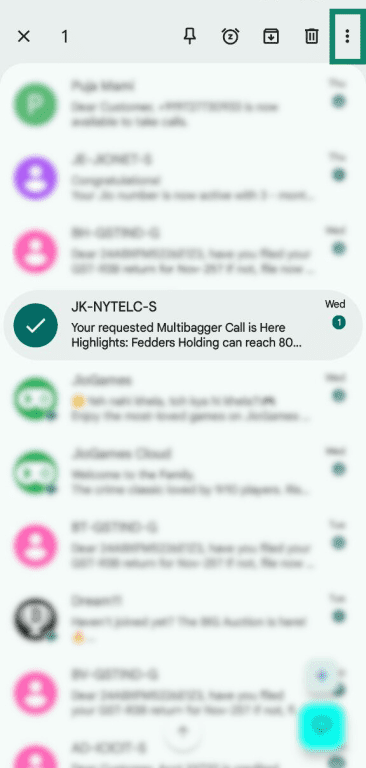
On Android, you can report a spam message to Google directly from the Messages app.
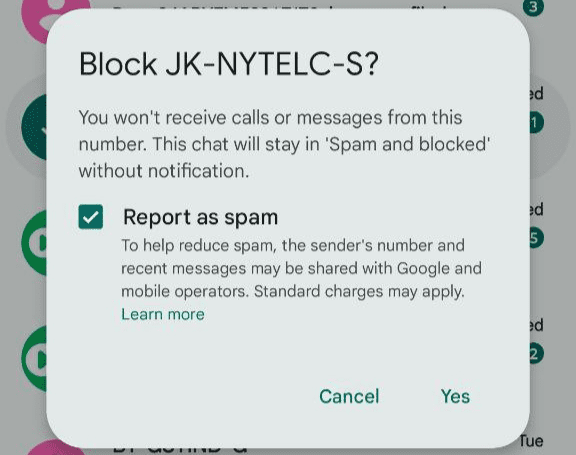
- Touch and hold the conversation you want to report. Tap the three-dot menu in the top-right corner.
- Click Block.
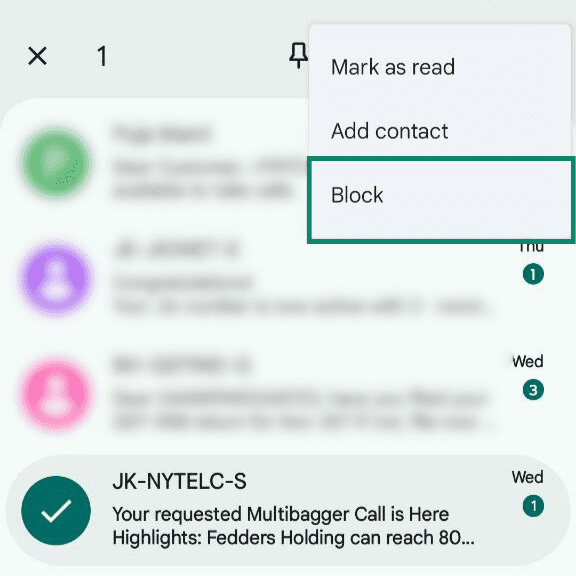
- On the pop-up that appears, make sure Report as Spam is selected. Click Yes.
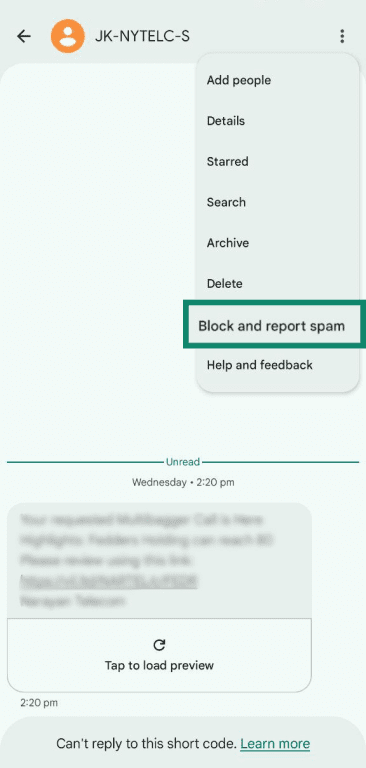
Alternatively, you can also report spam after opening a message.
- From the three-dot menu in the top-right corner, click Block and report spam.
- Select Report spam, then press Yes.
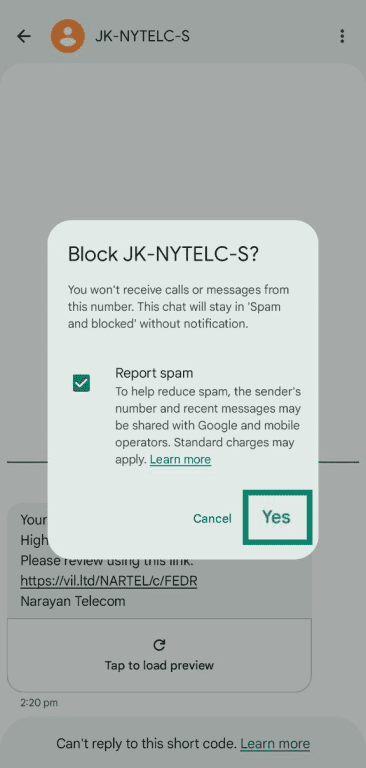
When you report spam, Google receives a copy of the last 10 messages from that sender, along with their phone number and an identifying Rich Communication Services (RCS) Message ID.
On iPhone:
iPhone users can report spam messages to Apple.
- If you haven’t opened the message, swipe left on it. Then, tap the red trash icon.
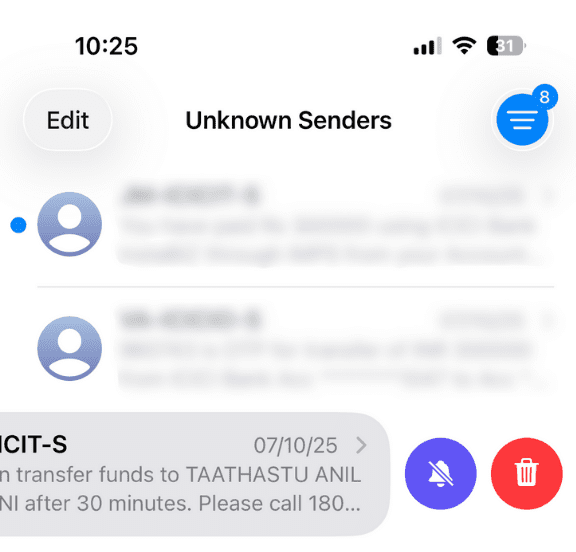
- Select Delete and Report Spam.
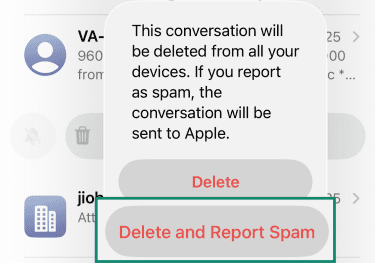
If you’ve already opened the message:
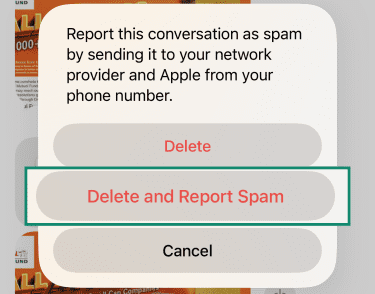
- Tap the Delete button at the bottom of the message.
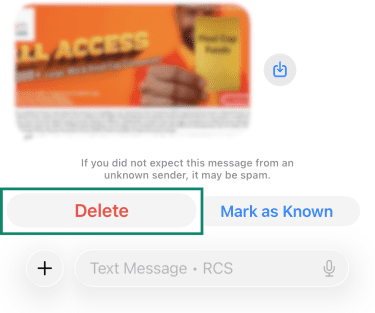
- Click Delete and Report Spam.
What to do if you become a victim of smishing
If you’ve fallen for a smishing attack, whether by clicking a malicious link, providing sensitive information, or downloading malware, it’s important to act quickly to minimize the damage. Here’s what to do next.
Scan your device for malware
If you clicked a link or downloaded a file from a smishing message, your device may be infected with malware. Take the following precautions:
- Run a security scan: Use a trusted mobile antimalware app.
- Look for unusual behavior: If your phone suddenly slows down, shows pop-ups, or apps crash frequently, malware may be the cause.
- Uninstall suspicious apps: Go to your app settings and remove any apps that you don’t recognize.
Change compromised passwords and enable 2FA
If you entered login credentials on a phishing website, it’s important to change your password immediately to prevent unauthorized access.
- Use a password manager to generate strong random passwords and store them securely.
- Enable two-factor authentication (2FA) on accounts that support it; this adds an extra layer of security by requiring a second verification step (such as a code sent to your phone).
- If your email account was compromised, go through its recovery settings to ensure scammers haven’t changed your backup email or phone number.
How to recover stolen data or money from smishing scams
If you’ve lost money or had personal information stolen due to a smishing scam, here’s how to take action:
- Contact your bank or credit card provider: If you provided your financial details, notify your bank immediately to monitor for suspicious activity, dispute fraudulent charges, and take further steps. Most financial institutions have fraud protection policies that can help recover lost funds.
- Monitor your accounts: Look out for unauthorized transactions or account changes and set up alerts to be notified of unusual activity.
- Freeze your credit (if necessary): If personal details such as your Social Security number or banking information were compromised, consider placing a credit freeze with the major credit bureaus in your country to prevent identity theft.
- Report identity theft: If scammers have misused your personal data, report the fraud to your country’s official identity theft protection service.
- File a police report (if needed): If you lost a significant amount of money or sensitive information, filing a police report may be necessary for further investigation.
How to protect yourself from smishing scams
Smishing scams are constantly evolving, making it crucial to stay proactive in protecting your personal information. By securing your SMS communications, using security tools, and practicing safe online habits, you can significantly reduce the risk of falling victim to smishing.
Best practices to secure your SMS communications
To minimize your exposure to smishing attacks, follow these best practices when handling SMS messages:
- Never click on links in unsolicited texts: If you receive a message claiming to be from your bank, a delivery service, or a government agency, go directly to the official website instead of clicking any links in the SMS.
- Verify senders before responding: Legitimate companies rarely ask for sensitive information via text. If you receive a message requesting personal details, contact the company directly through official channels.
- Avoid responding to unknown numbers: Responding to a smishing attempt in any way can confirm to scammers that your number is active, which may lead to more scam attempts.
- Keep your phone number private: Avoid sharing your number publicly on social media, forums, or unsecured websites to prevent it from being collected by scammers or data brokers who may sell your information to scammers.
- Be cautious of urgent or threatening messages: Scammers rely on fear and urgency to manipulate victims. If a message pressures you to act immediately, take a step back and verify its authenticity.
- Enable spam filtering on your phone: Both iOS and Android devices offer built-in spam protection tools to help filter out suspicious messages.
Using built-in phone security features
Beyond spam reporting, both Android and iOS offer built-in security features that can help protect you from smishing attacks without requiring any third-party apps.
They allow you to filter unknown texts, where messages from unknown senders are separated into a dedicated list. An unknown sender is typically a number that isn’t in your contacts or one you’ve never messaged before.
On iOS:
- Go to Settings, then Apps.
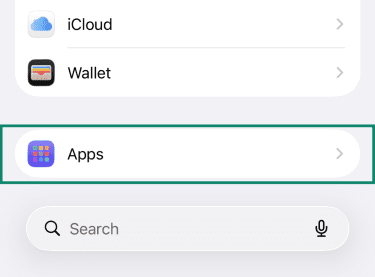
- Select Messages.
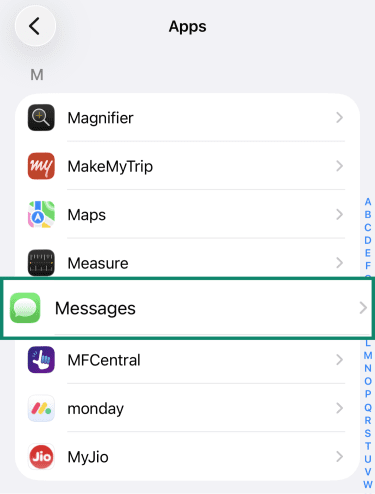
- Enable Screen Unknown Senders.
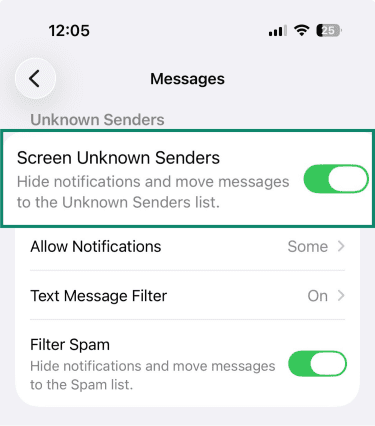
Apple will automatically move messages from Unknown Senders to a separate list. You can view this list by tapping the three-line icon in the top-right corner of the Messages app.
Note: You can also enable Filter Spam to hide notifications and move messages to the Spam list.
On Android:
- Open the Google Messages app and tap your profile picture in the top-right corner. Go to Message settings.
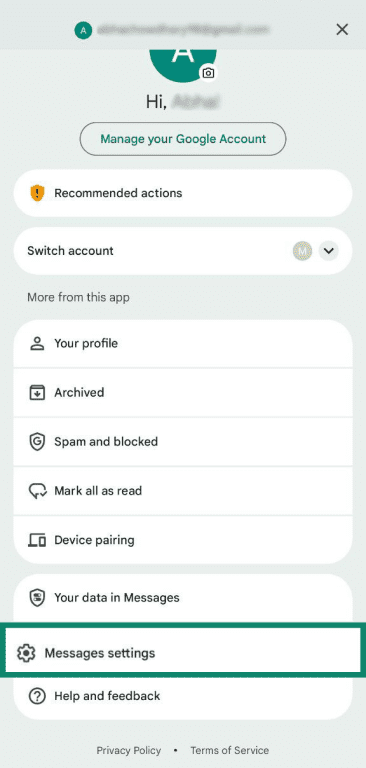
- Choose Protection and safety.
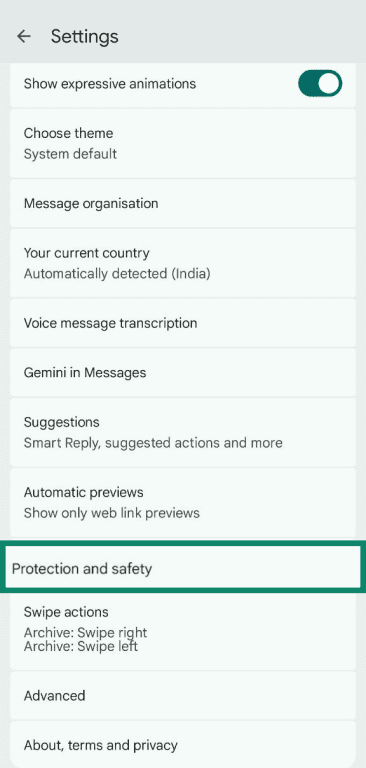
- Enable Spam protection.
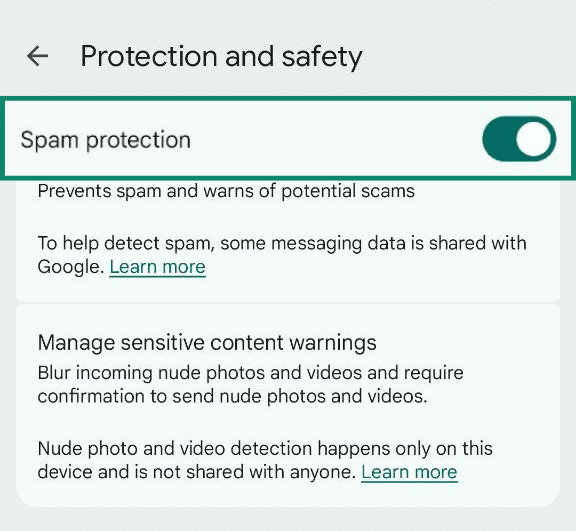
While this isn’t exactly the same feature as on iOS, Google’s spam protection can identify and flag scam attempts, including smishing, and either block the delivery or move the messages to a spam folder.
It’s important to note that filtering unknown senders doesn't automatically block all messages. However, you won’t receive notifications for these texts, and they’ll remain isolated in your inbox. This reduces the chances of accidentally clicking on a malicious link, and you may not even notice the message unless you check the Unknown Senders list.
Verifying unknown senders
If you receive a message from an unknown contact claiming to be your friend, bank, or a government agency, verify the sender’s identity before taking any action.
- If it’s a person you know: It may be worth reaching out to them directly to double-check whether they sent the message. This can also help alert them that a scam is being carried out in their name and may be targeting others in their circle.
- If it’s your bank or a government agency: Reach out through official channels such as toll-free numbers or in-app support to confirm its legitimacy.
However, if you’re unable to verify the sender, avoid replying or clicking any links and either ignore the message or report it as spam.
FAQ: Common questions about smishing
Should I delete phishing texts?
Yes, you should delete phishing texts, as it eliminates the risk of accidentally clicking on malicious links. However, it’s best to report them first to the appropriate authority, such as your mobile network provider, your phone’s OS provider, or a government agency. This helps limit the spread of these scams and protects both you and others from future attempts.
What happens if you open a phishing text?
Simply opening a phishing text message doesn’t cause any harm. The risk only arises when you click a malicious link, which can expose your personal information or install malware on your device. As long as you only open the message and then report or delete it, you’re safe.
Why am I suddenly getting phishing texts?
Receiving a fake text message scam doesn't necessarily mean there’s been a security lapse on your end. Most phishing campaigns send bulk messages to random numbers, and you may simply be in the line of fire.
These scams often surge during holiday seasons and major events to exploit public urgency. In other cases, signing up for websites, contests, or services may expose your phone number to third parties. Remember, you’ll be protected from smishing scams as long as you don’t click a link or provide your personal information.
Are there any apps to help identify phishing texts?
Yes, there are a few apps such as Truecaller that can identify and flag spam SMS. Similarly, apps like Textkiller (iOS) and Robokiller use predictive algorithms and AI to filter potentially dangerous text messages.
However, third-party apps aren’t foolproof and may produce false positives, so it's best to exercise caution when interacting with messages from unknown senders.
Is smishing illegal?
Yes, smishing is illegal in most countries as it involves fraud, identity theft, or unauthorized access to personal data. Many countries have agencies that actively investigate smishing operations, and those caught running these scams can face significant fines or imprisonment. However, because scammers often operate internationally, tracking and prosecuting them can be challenging. If you receive a smishing message, it’s important to report it to the relevant authorities.
Can smishing lead to identity theft?
Yes, smishing can be a gateway to identity theft if you unknowingly provide scammers with sensitive information such as your Social Security number, bank details, or login credentials. Cybercriminals use this information to access your financial accounts, open credit lines in your name, or even commit identity fraud. In some cases, scammers sell stolen personal data on the dark web, putting victims at risk for long-term identity fraud. If you suspect your information has been compromised, immediately monitor your accounts, update passwords, and report the incident to fraud prevention services and your bank if necessary.
Can my phone be hacked through a smishing link?
Yes, clicking a smishing link can expose your phone to malware, spyware, or phishing sites designed to steal your data. Some links automatically download malicious software to your phone, which can track your keystrokes, access personal files, or even remotely control your device. While modern smartphones have security protections in place, they aren’t foolproof. If you suspect your phone has been compromised, it’s important to remove the malware. This can include immediately running a security scan, uninstalling suspicious apps, and updating your operating system to remove potential threats.
Take the first step to protect yourself online. Try ExpressVPN risk-free.
Get ExpressVPN